

Text messaging terms
Walkie Pro
Last updated: 30 September 2026 Version: 1.3
These terms cover every text message Walkie Pro sends. Walkie Pro is a service of Walkie Corporation, a California corporation. They sit alongside our Terms of Use and Privacy Policy; where these terms say more about a text message, these terms apply.
1. Texts are your choice
Agreeing to receive text messages is not a condition of using Walkie Pro, of any purchase, or of asking a crew for access. Accepting our Terms of Use is not consent to text messages. Each programme in Section 2 starts only when you take a separate step for it.
The one text that is part of creating an account is the sign-in code in Section 2.1: you ask for it, it goes to the number you typed, and nothing follows from it.
We never send marketing texts.
2. The programmes
2.1 Sign-in codes
How it starts: you ask for a code when you sign in or confirm your phone number in the app. What you get: one text with a one-time code. Message frequency: one message each time you ask for a code.
2.2 The download link
How it starts: on walkiepro.com/get-the-app/ you type your mobile number into the optional “Text me a link to Walkie Pro” form and tick its checkbox, which is not ticked when the page loads. The same page offers a browser link and a QR code that need no phone number. What you get: one text with a link to the app. Message frequency: one message each time you ask. Nothing recurs.
2.3 Jobsite access requests
How it starts: on a job’s public page, reached from a QR code posted at the jobsite, you ask the crew to let you in and choose how we reach you: Text me or Email me. Neither is chosen for you. If you choose text, you tick a checkbox — not ticked when the page loads — that reads: “Yes, text me about this request. Walkie Pro jobsite access sends up to 2 texts per request: a code to confirm this number, and a link if the crew lets you in. Msg & data rates may apply. Reply STOP to opt out, HELP for help.” If you choose email you get no texts at all, and the request works the same way.
What you get: a code or tap-link to confirm the number and, if the crew lets you in, a link to a private page. If you later ask for a lost link again, one more text. Message frequency: one or two messages for each request or recovery. Nothing recurs.
2.4 Call summaries and voice messages from a Walkie Pro user
How it starts: a Walkie Pro user who has talked with you asks you, on a call or in person, whether they can text you. They say something like: “Can I text you a summary of our calls from Walkie Pro? You’ll get one text after each call. Message and data rates may apply. Reply STOP any time to opt out, or HELP for help.” If you agree, they record that in the app. Nothing is sent to your number until they do, and we check that record again before every text. What you get: after a call with that person, one text with a short summary of the call. If you missed their call, you get a note asking you to call back, or the voice message they left, with its recording attached as audio. Texts come from a Walkie Pro number, or from that person’s Walkie line, a phone number we lease for them. The first text from a Walkie line also carries a contact card so you can save the number. The first text to your number says who it is from, that message and data rates may apply, and how to get help or stop. Message frequency: about one message per call with that person, so it depends on how often they call you. These are not marketing texts. The full rules are in Section 6.9 of our Terms of Use.
2.5 Callback and reply texts
How it starts: on the contact form at walkiepro.com/contact/, which also appears on walkiepro.com/setup-help/, you choose Call or text me as the way you want us to get back to you, tell us what it is about, and then enter your phone number. Under the number a checkbox, not ticked, reads: “Walkie Pro can call or text me back about this message. Message and data rates may apply. Reply STOP to opt out and HELP for help. See our privacy policy and messaging terms.” If you leave it unticked we do not keep the number, and the form offers email instead: choose it and we answer your message by email. What you get: a call or a text back about that message, and nothing else. These are not marketing texts. Message frequency: only the messages in the conversation you started about that message. Nothing recurs.
2.6 Texts after a call to Walkie support
How it starts: you call Walkie support at +1 (323) 504-7400, or our Spanish-language support line. A notice at the start of the call tells you it is recorded. During the call, the AI assistant that answers may offer to text you. It asks with one of these four questions, word for word:
- “Want me to text the link to the number you’re calling from? It’s one text from Walkie Pro. Message and data rates may apply. Reply STOP to opt out or HELP for help.”
- “Want a text recap of this call at this number? It’s one text from Walkie Pro. Message and data rates may apply. Reply STOP to opt out or HELP for help.”
- “¿Quiere que le mande el enlace por mensaje al número desde el que llama? Es un solo mensaje de Walkie Pro. Pueden aplicarse tarifas de mensajes y datos. Responda STOP para cancelar o HELP para ayuda.”
- “¿Quiere un resumen de esta llamada por mensaje a este número? Es un solo mensaje de Walkie Pro. Pueden aplicarse tarifas de mensajes y datos. Responda STOP para cancelar o HELP para ayuda.”
Nothing is sent unless you say yes in your reply to that question. We text only the number you are calling from, never another number. What you get: the app link you asked for, and/or one recap of that call. The link is sent during the call; the recap is sent after the call ends. These are not marketing texts. Message frequency: one text for each request. Nothing recurs.
3. At a glance
| Programme | How it starts | Messages |
|---|---|---|
| Sign-in codes | You ask for a code | One for each code you ask for |
| Download link | You tick the box on the optional form | One for each request |
| Jobsite access requests | You choose “Text me” and tick the box | One or two for each request or recovery |
| Callback and reply texts | You choose “Call or text me” on the contact form and tick the box | Only those in the conversation you started about your message |
| Call summaries and voice messages | You tell a Walkie Pro user who called you that they can text you | About one for each call with them |
| Texts after a call to Walkie support | You say yes when the assistant asks on a recorded call | One for each request |
4. Stopping, and help
Reply STOP to any Walkie Pro text to stop it. Reply HELP for help, or write to support@walkiepro.com. For jobsite access requests an opt-out applies across Walkie Pro — it stops those texts from every job, not only the one you asked about. If you reply STOP to a sign-in code and later need another, reply START first or write to us. For call summaries and voice messages, an opt-out applies to every Walkie Pro user and every Walkie Pro number, and replying START does not restart them: write to support@walkiepro.com.
5. Costs and carriers
Message and data rates may apply. Carriers are not liable for delayed or undelivered messages.
6. Your number stays with us
No mobile information will be shared with third parties or affiliates for marketing or promotional purposes. Text messaging originator opt-in data and consent will not be shared with any third parties. We give your number to our messaging provider, Twilio, only to deliver the message. If you asked us to call or text you back about a message you sent through our contact form, your number is kept with that message in our customer-support inbox, SparrowDesk, only so we can reply to you. See Privacy Policy §6.7 and §6.8.
7. Where you opt in
Each form, as it appears. Each page loads with nothing ticked and nothing chosen.
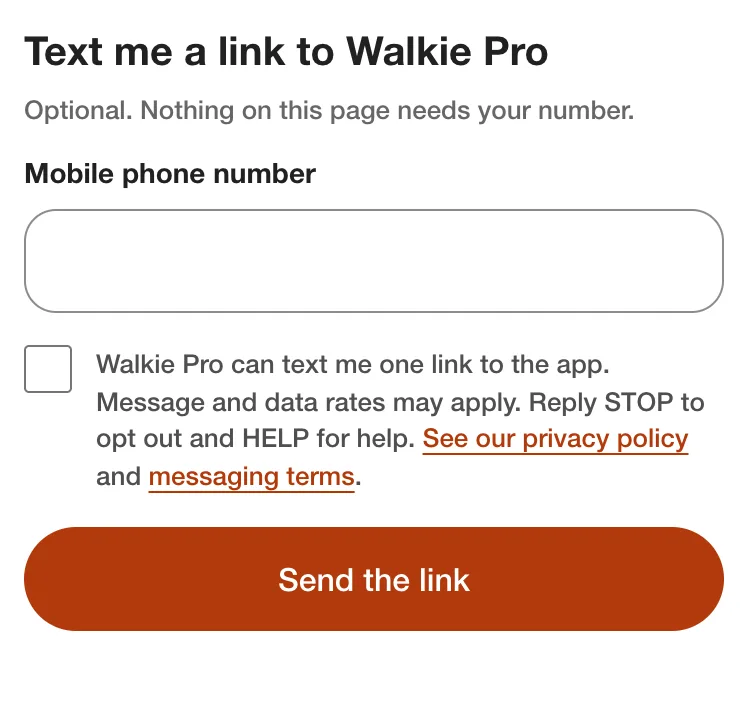
The download-link form at walkiepro.com/get-the-app/. Its checkbox reads: “Walkie Pro can text me one link to the app. Message and data rates may apply. Reply STOP to opt out and HELP for help. See our privacy policy and messaging terms.”
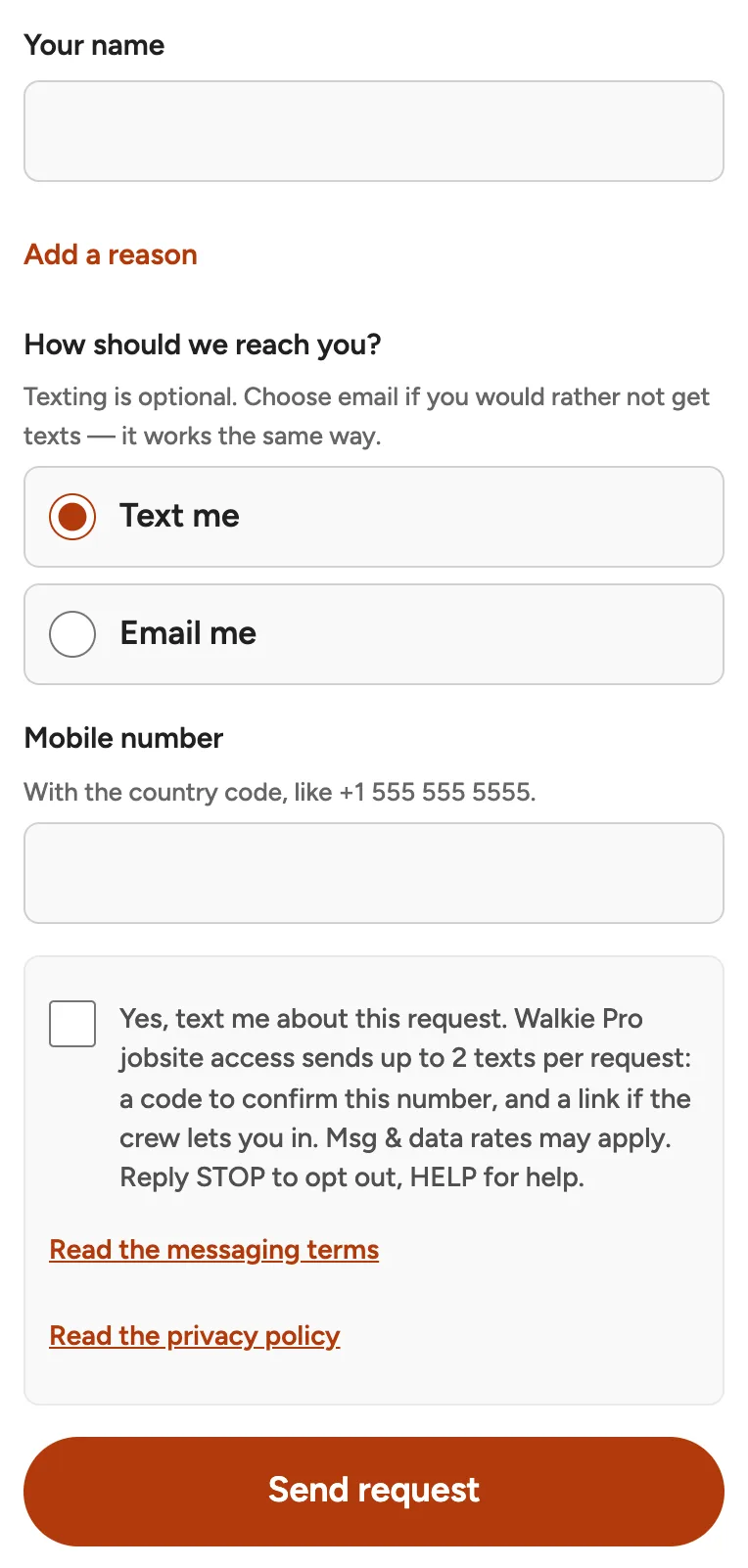
A jobsite access request with “Text me” chosen. The checkbox reads as quoted in Section 2.3.
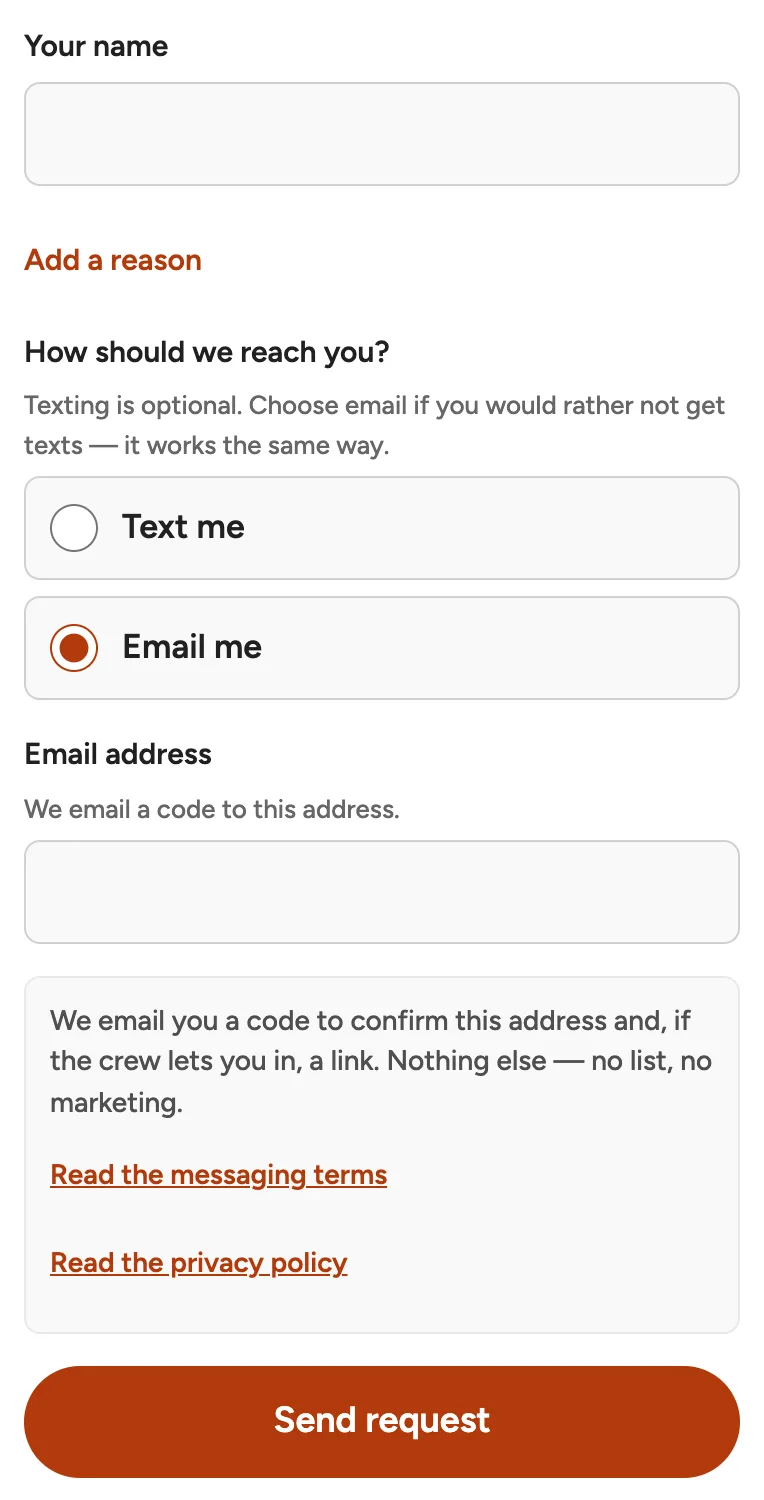
The same request with “Email me” chosen: no phone number and no texting consent.
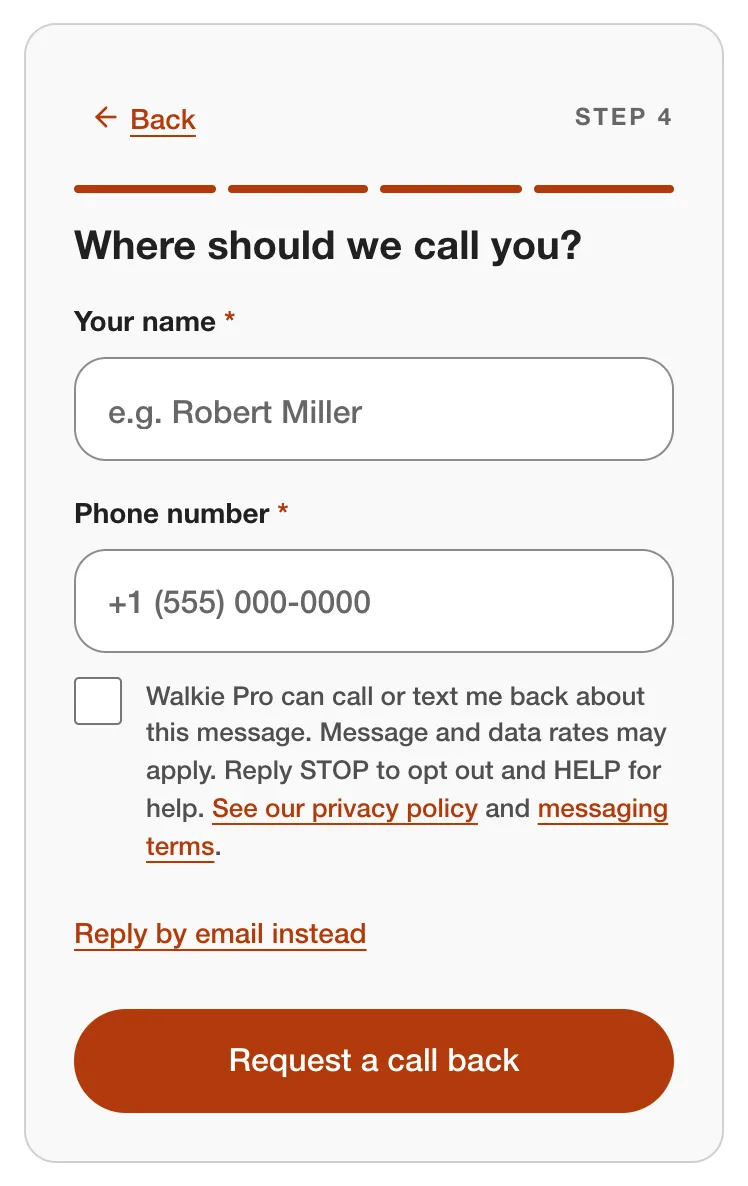
The contact form at walkiepro.com/contact/ with “Call or text me” chosen. Its checkbox reads as quoted in Section 2.5.
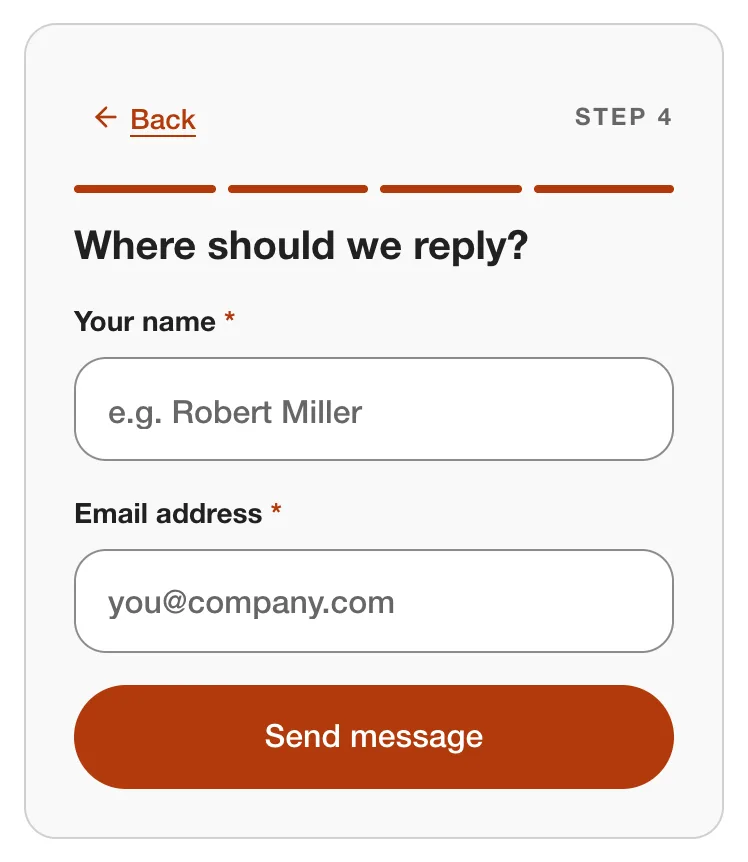
The same form with “Email me” chosen: no phone number and no texting consent.
Call summaries and voice messages (Section 2.4) are opted into inside the Walkie Pro app, not on a website. After a call with someone who isn’t on Walkie Pro, the app shows the Walkie Pro user: “You need {name}’s permission first. Ask on a call or in person.” A “What to say” control shows the script quoted in Section 2.4. Below it is a box, not ticked, that reads “{name} agreed to receive call recap texts from me”. The button that sends the text stays off until that box is ticked, and nothing is ever sent to a number with no such record.
Texts after a call to Walkie support (Section 2.6) are opted into by voice, on a recorded call, not on a website or in the app. Every call opens with a notice that it is recorded. When the assistant offers a text, it asks with one of the questions quoted in Section 2.6, word for word, and a text is sent only after the caller says yes in their reply to it. With each yes we keep the caller’s words, the version of the question they were asked, and when in the call they said yes; the call recording is the rest of the record. Nothing is ever sent to a number other than the one the call came from.
8. Changes to these terms
We may update these terms. When we do, we change the date at the top of this page.
9. Contact
Write to support@walkiepro.com. Our address for legal notices is in Section 27 of our Terms of Use.